> For the complete documentation index, see [llms.txt](https://wiki.uksivt.xyz/llms.txt). Markdown versions of documentation pages are available by appending `.md` to page URLs; this page is available as [Markdown](https://wiki.uksivt.xyz/plaginy-flutter.md).

# Плагины Flutter

1. **Awesome Flutter Snippets**

<figure><img src="/files/P0jmbWcfbHY9P27dKi6k" alt=""><figcaption></figcaption></figure>

Тупо автокомлитер для огромных бойлерплейтов кода, удобен создавать целые окна вписва всего stl/stf

2. Dart Data Class Generator

<figure><img src="/files/oOBFehw4khchbxNXTVSK" alt=""><figcaption></figcaption></figure>

Генератор методов для класса, по сути превращающий его в дата класс. Полезно для быстрого создания класса для парсинга его из жисонов и наобарот

3. bloc

<figure><img src="/files/bctxQjf6LgW2WxNXsVn3" alt=""><figcaption></figcaption></figure>

Сниппеты для блоков, если вы им конечно пользуетесь

4. CodeSnap

<figure><img src="/files/QwFK87r4t0UKk2MlTaL4" alt=""><figcaption></figcaption></figure>

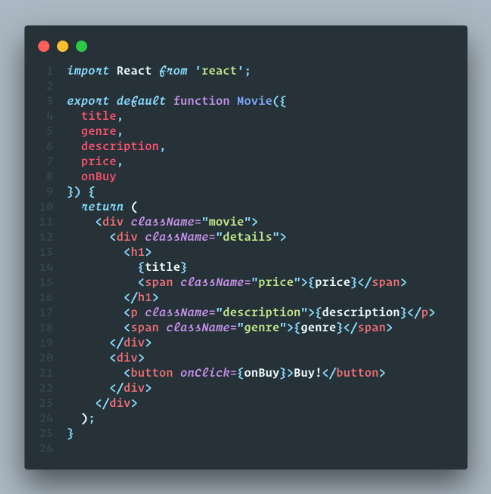
Позволяет красиво фоткать блоки кода. Полезно чтобы засунуть в презу красивую пикчу

<figure><img src="/files/hBalpXDxLopExRmIY83g" alt=""><figcaption></figcaption></figure>

5. Error Lens

<figure><img src="/files/0hI1t5vURFQNii3e1GnP" alt=""><figcaption></figcaption></figure>

Считаю лучшим плагином в мире. Подсвечивает ошибку прямо перед тобой, не нужно наводиться на микромелку полоску и ждать 0.6 сек для просмотра ошибки

<figure><img src="/files/WQBKMydEtGSjIsYiiCLt" alt=""><figcaption></figcaption></figure>

6. Flutter Color

<figure><img src="/files/BhLbZndzLpOyeoGbxOAg" alt=""><figcaption></figcaption></figure>

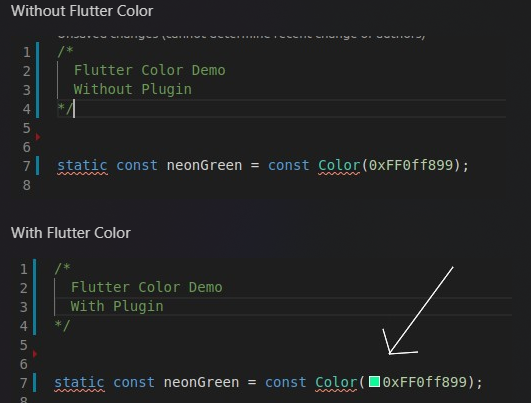
Показывает мелкий интерактивный квадратик с переменной цвета, имеет встроенный колор пикер. Удобно для быстрой смены цвета в хексе

<figure><img src="/files/leMkfFHhugSV3C8XeKq1" alt=""><figcaption></figcaption></figure>

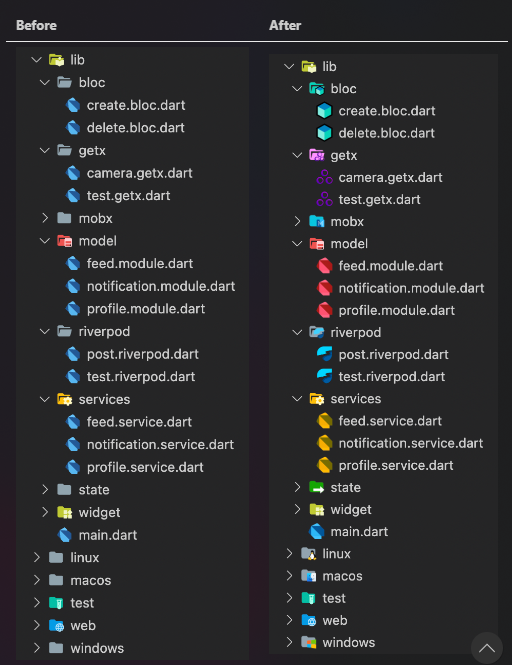
7. Flutter Icons

<figure><img src="/files/FwA2bM3pIsDQXI1VJeog" alt=""><figcaption></figcaption></figure>

Не маленькие, сами видите&#x20;

<figure><img src="/files/lZ4rd5DnfRLhoz4kslpZ" alt=""><figcaption></figcaption></figure>

8. Flutter Riverpod Snippets

<figure><img src="/files/iXcWkHkhuawmqhCzve2D" alt=""><figcaption></figcaption></figure>

Сниппеты для бойлеплейтов риверпода, считаю имбой. Ставить обязательо если используете его

9. Image preview

<figure><img src="/files/8eYraVHKk3jnGhH54Gqg" alt=""><figcaption></figcaption></figure>

Отображает картинку из кода, удобно.

<figure><img src="/files/Ot0maEkDfXJ6nMB97HXf" alt=""><figcaption></figcaption></figure>

10. Svg Preview

<figure><img src="/files/J9gbBEK0ahKhVILY7uvm" alt=""><figcaption></figcaption></figure>

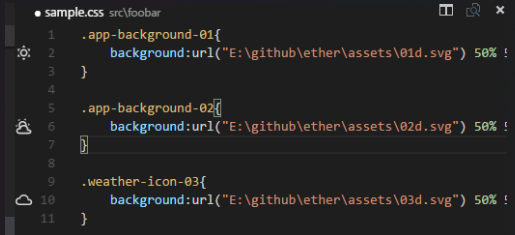
Тоже самое, но с svg. Ставить обязательно. Можно на лету менять код. По сути можно просто копипастить свг из фигмы прям в код через этот плагин, что ускорит верстку в триллиард раз

11. Version Lens

<figure><img src="/files/SUvVjDCoouUrYnVHbcXt" alt=""><figcaption></figcaption></figure>

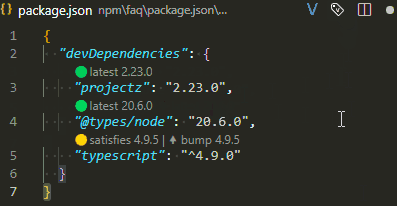
Наглядно отображает версии пакетов в пабспеке. Немного сомнительное расширение, ибо работает оч медленно и и тупо, но для домашнего девелопинга пойдет. Противопоказано на чемпе из-за жестких пролагов в пабспеке

<figure><img src="/files/vAZDKFxCFT8FmTkUzOQk" alt=""><figcaption></figcaption></figure>

12. YAML

<figure><img src="/files/KUg0JYezCUyJ4XPa527w" alt=""><figcaption></figcaption></figure>

Тупо линтер для ямла. Полезно чтобы не поломать себе пабспек


---

# Agent Instructions
This documentation is published with GitBook. GitBook is the documentation platform designed so that both humans and AI agents can read, navigate, and reason over technical content effectively. Learn more at gitbook.com.

## Querying This Documentation
If you need additional information that is not directly available in this page, you can query the documentation dynamically by asking a question.

Perform an HTTP GET request on the current page URL with the `ask` query parameter, and the optional `goal` query parameter:

```
GET https://wiki.uksivt.xyz/plaginy-flutter.md?ask=<question>&goal=<endgoal>
```

`ask` is the immediate question: it should be specific, self-contained, and written in natural language.
`goal` is optional and describes the broader end goal you are ultimately trying to accomplish on behalf of the user. GitBook uses it to tailor the answer towards what is most useful for that goal.

The response will contain a direct answer to the question and relevant excerpts and sources from the documentation.

Use this mechanism when the answer is not explicitly present in the current page, you need clarification or additional context, or you want to retrieve related documentation sections.